
A Complete Guide to Filtering in Vector Search
Sabrina Aquino, David Myriel, Ewa Szyszka
·July 02, 2026

Vector search is a ranking system, not a filter system. Every point in your collection is a candidate, which based on the semantic similarity to the query would get surfaced. That works well when you want “what’s most relevant.” It becomes insufficient when the result must also satisfy hard constraints: exact values, ranges, categorical membership, or payload-level conditions that similarity alone cannot enforce.
Filtering is Qdrant’s mechanism for combining semantic retrieval with predicate-based constraints. This guide covers how it works, when to use it, and how to configure indexing to keep filtered queries fast and accurate.
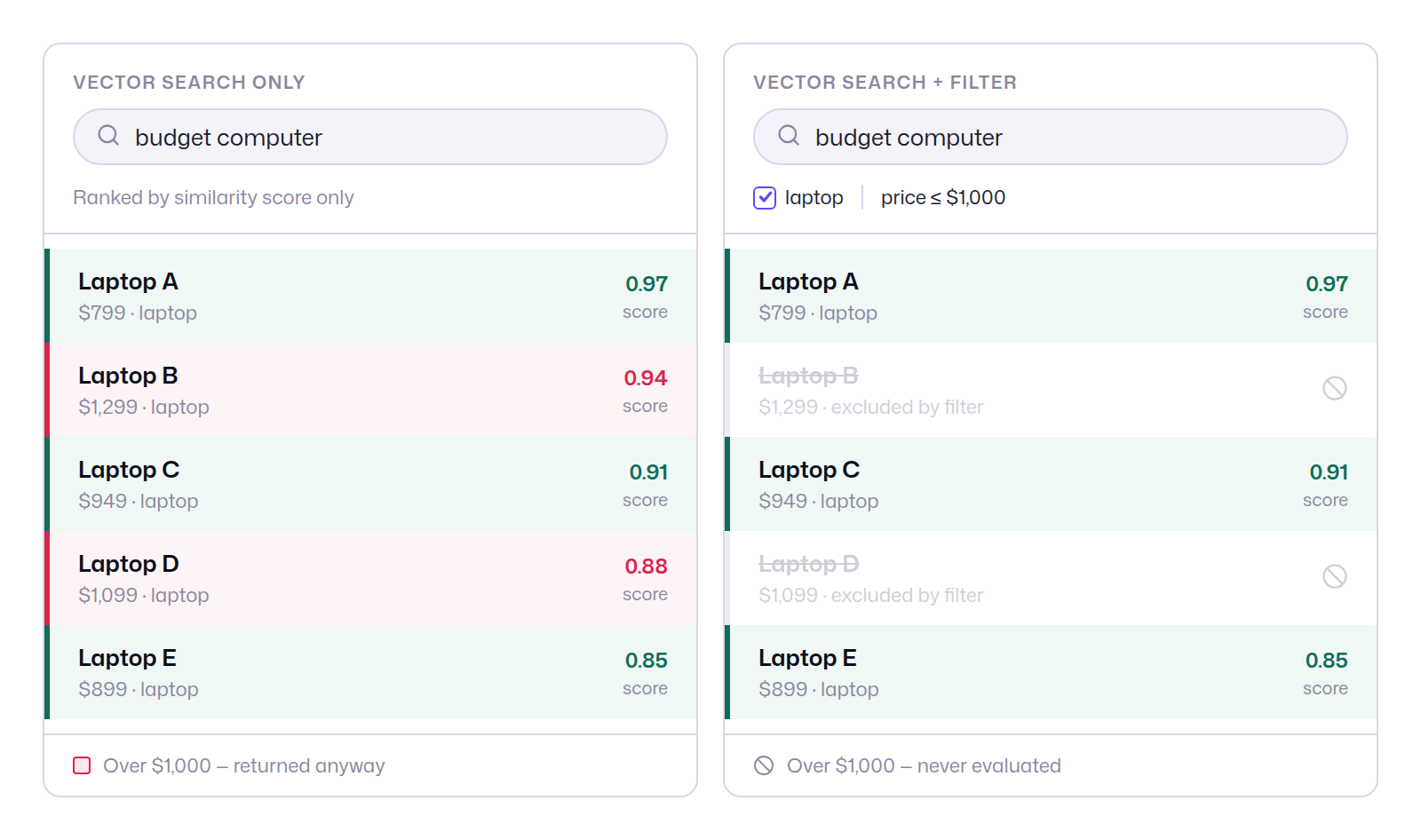
Take an e-commerce scenario where a customer searches for a budget computer. Vector search alone surfaces the most semantically similar results, but similarity has no concept of price. Without a payload filter, a $1,299 laptop ranks second simply because its embedding is close to the query. Add a price ≤ $1,000 filter and Qdrant evaluates the constraint before scoring: over-budget candidates are excluded entirely, never ranked, never returned. The result set is both relevant and correct.
Data Model: Points, Vectors, and Payloads
When storing data in Qdrant, each product is a point, consisting of an id, a vector and payload:
{
  "id": 1,
  "vector": [0.1, 0.2, 0.3, 0.4],
  "payload": {
    "price": 899.99,
    "category": "laptop"
  }
}
id: a unique identifier within the collection.vector: a dense embedding representing the point’s semantic position in the vector space.payload: arbitrary metadata attached to the point, queryable via filter conditions.
Though we may not be able to decipher the vector, we are able to derive additional information about the item from its metadata, In this specific case, we are looking at a data point for a laptop that costs $899.99.
What Is Filtering?
When searching for the perfect computer, your customers may end up with results that are mathematically similar to the search entry, but not exact. For example, if they are searching for laptops under $1000, a simple vector search without constraints might still show other laptops over $1000.
This is why semantic search alone may not be enough. In order to get the exact result, you would need to enforce a payload filter on the price. Only then can you be sure that the search results abide by the chosen characteristic.
This is called filtering and it is one of the key features of vector databases.
Here is how a filtered vector search looks behind the scenes. We’ll cover its mechanics in the following section.
POST /collections/online_store/points/search
{
  "vector": [ 0.2, 0.1, 0.9, 0.7 ],
  "filter": {
    "must": [
      {
        "key": "category",
        "match": { "value": "laptop" }
      },
      {
        "key": "price",
        "range": {
          "gt": null,
          "gte": null,
          "lt": null,
          "lte": 1000
        }
      }
    ]
  },
  "limit": 3,
  "with_payload": true,
  "with_vector": false
}
The filtered result will be a combination of the semantic search and the filtering conditions imposed upon the query. In the following pages, we will show that filtering is a key practice in vector search for two reasons:
- With filtering in Qdrant, you can dramatically increase search precision. More on this in the next section.
- Filtering helps control resources and reduce compute use. More on this in Payload Indexing.
When to Filter vs. When Not To
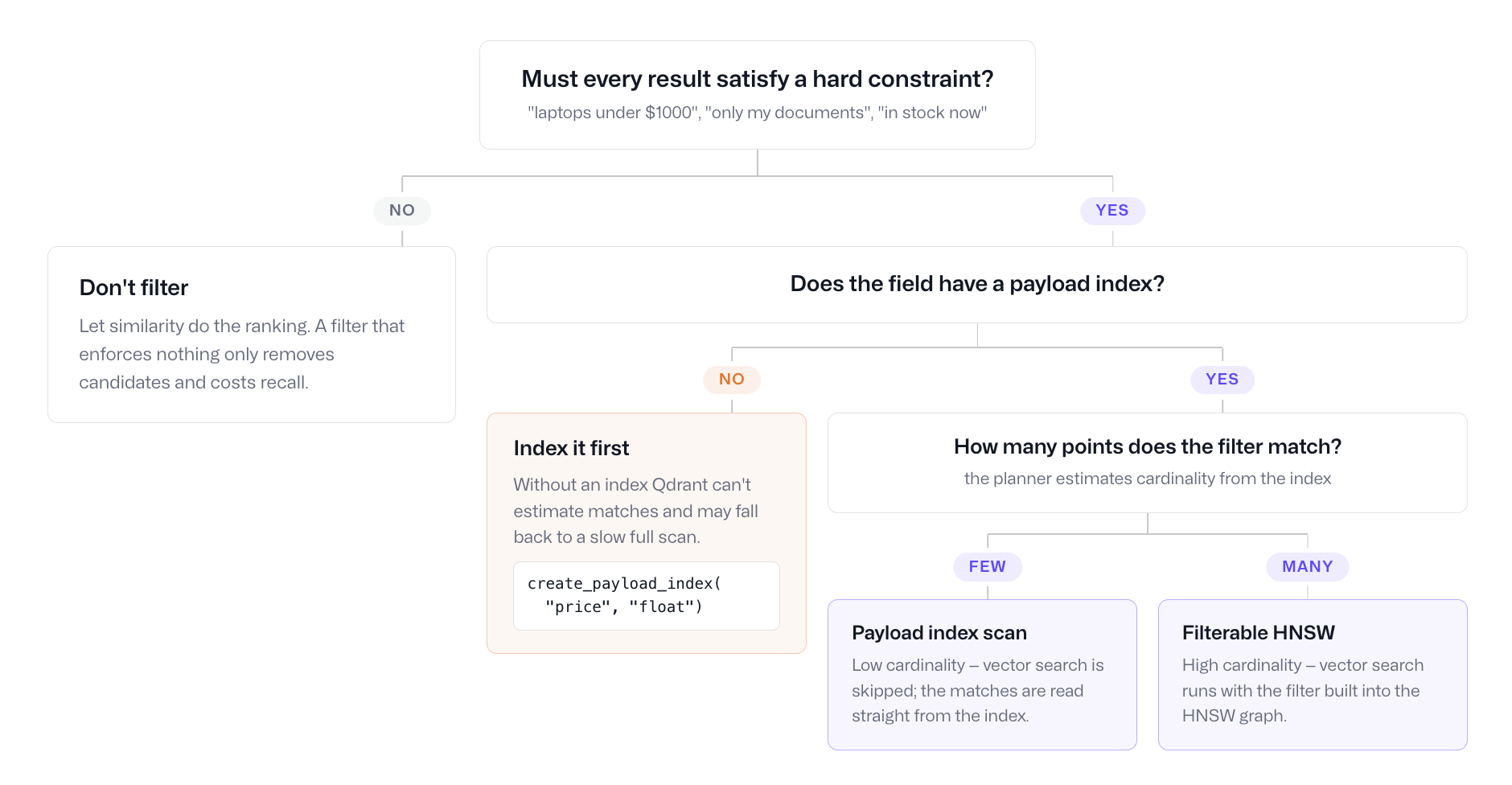
In vector search, filtering and sorting are more interdependent than they are in traditional databases. While databases like SQL use commands such as WHERE and ORDER BY, the interplay between these processes in vector search is a bit more complex. Not every query benefits from filtering. Applying a filter has coordination cost: the query planner must resolve the filter against the index, estimate cardinality, and select an execution strategy. For very broad filters (high cardinality, matching most of the dataset), the overhead may outweigh the gain.
Use this decision tree to determine whether filtering is appropriate for a given query:
How Qdrant Handles Filtered Vector Search
The Filterable HNSW Index
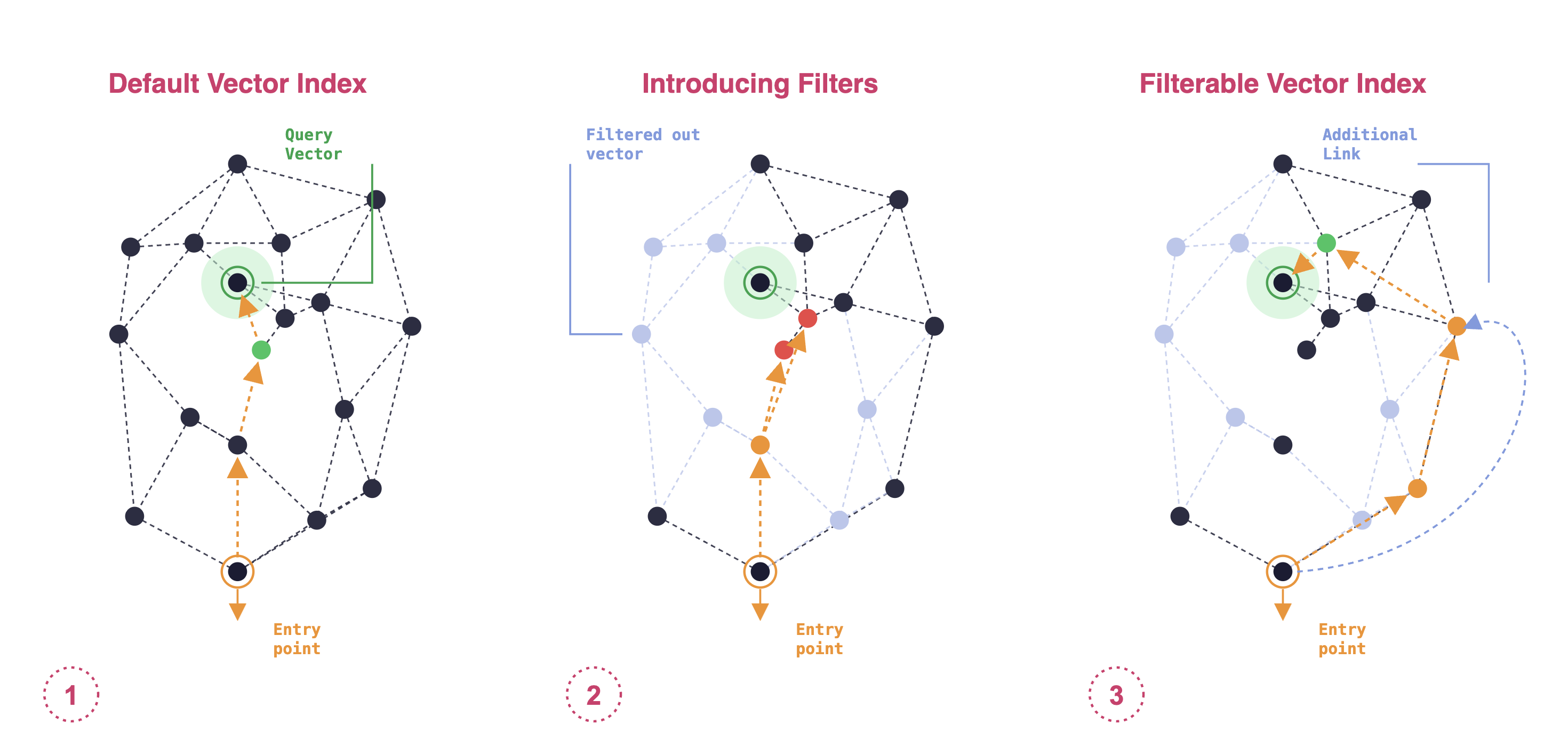
Qdrant’s default vector index is HNSW (Hierarchical Navigable Small World), a graph-based approximate nearest neighbor structure. Each point is a node; edges connect points that are geometrically close.
When a filter is applied, some nodes become ineligible. In a naive implementation, this disconnects the graph: the HNSW traversal cannot cross excluded nodes to reach a valid nearest neighbor.
Qdrant solves this by building additional edges between eligible nodes that would otherwise be separated. This produces a filterable HNSW graph that remains traversable after any subset of nodes is excluded.
Pre-Filtering and Post-Filtering: Why Neither Works Alone
The filterable vector index is Qdrant’s solves pre and post-filtering problems by adding specialized links to the search graph. It aims to maintain the speed advantages of vector search while allowing for precise filtering, addressing the inefficiencies that can occur when applying filters after the vector search.
Pre-filtering narrows the dataset by payload predicate first, then runs vector search over the filtered subset. This is efficient when the filter is highly selective (few results survive). When the filter is broad (many results survive), the HNSW graph over the filtered subset is fragmented—too many links have been removed—and search accuracy degrades.
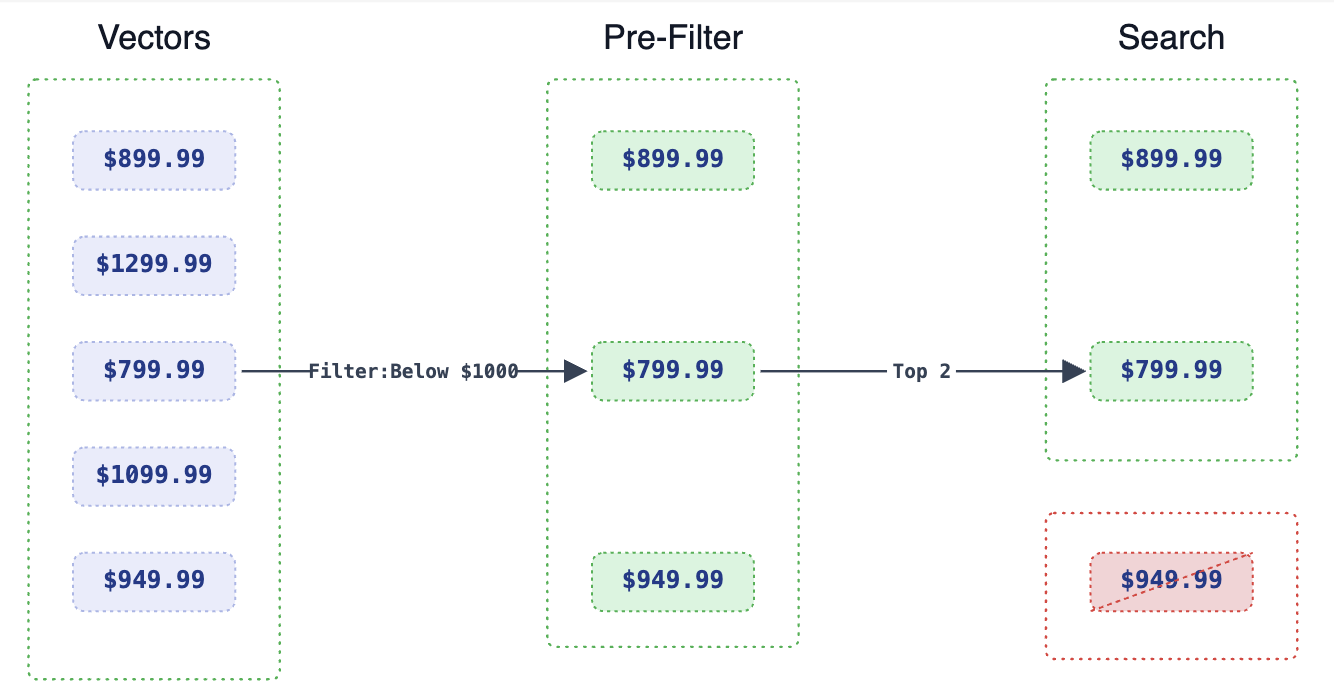
Post-filtering runs vector search first, retrieves a large candidate set, then applies the filter. This is accurate when the filter is broad (most candidates pass). When the filter is selective, most retrieved candidates are discarded, wasting computation—and if the qualifying points were not in the initial candidate set, they will never appear in results at all.
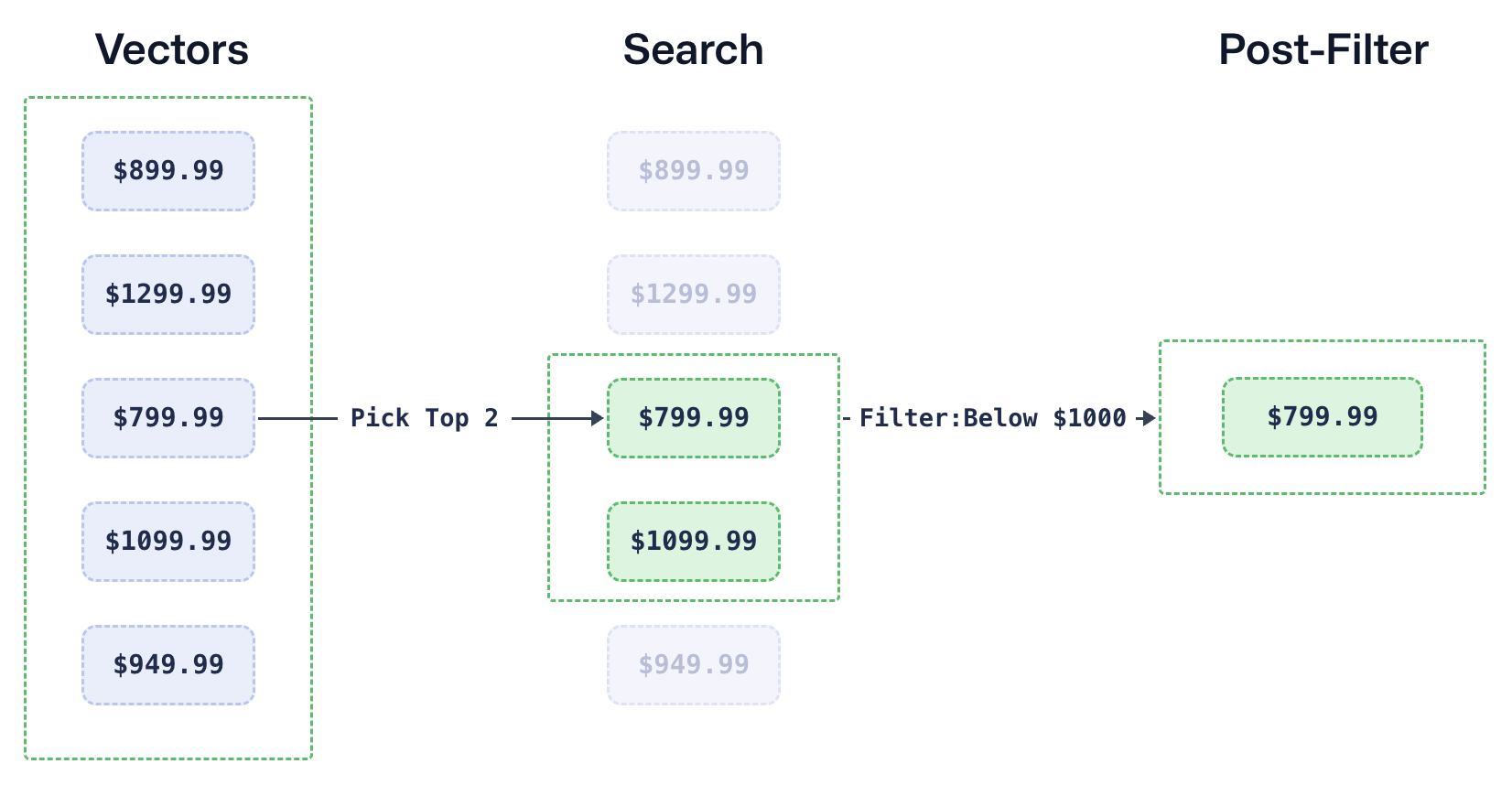
Qdrant’s filterable HNSW avoids this trade-off by building graph links that remain valid under any filter. The query planner also switches dynamically between HNSW traversal and payload-index-based retrieval depending on estimated filter cardinality—see Payload indexing below.
Filtering Mechanics: Conditions and Clauses
Clauses
Clauses determine how multiple conditions are combined:
| Clause | Behaviour | SQL analogue |
|---|---|---|
must | All conditions must match | AND |
should | At least one condition must match | OR |
must_not | No conditions may match | NOT |
| Clause combination | Combines multiple clauses | AND between clause groups |
Conditions
| Condition | Description |
|---|---|
match | Exact value match on a keyword or integer field |
match_any | Matches any value in a provided list |
match_except | Excludes specific values |
range | Numeric or datetime range |
datetime_range | Explicit datetime range with timezone support |
geo_bounding_box / geo_radius / geo_polygon | Geospatial conditions |
full_text | Tokenised text search within a field |
nested | Evaluates conditions per element of an object array |
is_empty | Matches points where a field is absent or an empty array |
is_null | Matches points where a field is null |
has_id | Matches specific point IDs |
values_count | Matches on the number of elements in an array field |
For the complete reference, see the filtering documentation.
Basic Filtering Example: E-commerce and Laptops
We know that there are three possible laptops that suit our price point. Let’s see how Qdrant’s filterable vector index works and why it is the best method of capturing all available results.
First, add five new laptops to your online store. Here is a sample input:
laptops = [
    (1, [0.1, 0.2, 0.3, 0.4], {"price": 899.99, "category": "laptop"}),
    (2, [0.2, 0.3, 0.4, 0.5], {"price": 1299.99, "category": "laptop"}),
    (3, [0.3, 0.4, 0.5, 0.6], {"price": 799.99, "category": "laptop"}),
    (4, [0.4, 0.5, 0.6, 0.7], {"price": 1099.99, "category": "laptop"}),
    (5, [0.5, 0.6, 0.7, 0.8], {"price": 949.99, "category": "laptop"})
]
The four-dimensional vector can represent features like laptop CPU, RAM or battery life, but that isn’t specified. The payload, however, specifies the exact price and product category.
Now, set the filter to “price is less than $1000”:
{
  "key": "price",
  "range": {
    "gt": null,
    "gte": null,
    "lt": null,
    "lte": 1000
  }
}
When a price filter of equal/less than $1000 is applied, vector search returns the following results:
[
  {
    "id": 3,
    "score": 0.9978443564622781,
    "payload": {
      "price": 799.99,
      "category": "laptop"
    }
  },
  {
    "id": 1,
    "score": 0.9938079894227599,
    "payload": {
      "price": 899.99,
      "category": "laptop"
    }
  },
  {
    "id": 5,
    "score": 0.9903751498208603,
    "payload": {
      "price": 949.99,
      "category": "laptop"
    }
  }
]
As you can see, Qdrant’s filtering method has a greater chance of capturing all possible search results.
This specific example uses the range condition for filtering. Qdrant, however, offers many other possible ways to structure a filter
For detailed usage examples, filtering docs are the best resource.
Scrolling Instead of Searching
You don’t need to use our search and query APIs to filter through data. The scroll API is another option that lets you retrieve lists of points which meet the filters.
If you aren’t interested in finding similar points, you can simply list the ones that match a given filter. While search gives you the most similar points based on some query vector, scroll will give you all points matching your filter not considering similarity.
In Qdrant, scrolling is used to iteratively retrieve large sets of points from a collection. It is particularly useful when you’re dealing with a large number of points and don’t want to load them all at once. Instead, Qdrant provides a way to scroll through the points one page at a time.
You start by sending a scroll request to Qdrant with specific conditions like filtering by payload, vector search, or other criteria.
Let’s retrieve a list of top 10 laptops ordered by price in the store:
POST /collections/online_store/points/scroll
{
    "filter": {
        "must": [
            {
                "key": "category",
                "match": {
                    "value": "laptop"
                }
            }
        ]
    },
    "limit": 10,
    "with_payload": true,
    "with_vector": false,
    "order_by": [
        {
            "key": "price",
        }
    ]
}
The response contains a batch of points that match the criteria and a reference (offset or next page token) to retrieve the next set of points.
Scrolling is designed to be efficient. It minimizes the load on the server and reduces memory consumption on the client side by returning only manageable chunks of data at a time.
Available Filtering Conditions
| Condition | Usage | Condition | Usage |
|---|---|---|---|
| Match | Exact value match. | Range | Filter by value range. |
| Match Any | Match multiple values. | Datetime Range | Filter by date range. |
| Match Except | Exclude specific values. | UUID Match | Filter by unique ID. |
| Nested Key | Filter by nested data. | Geo | Filter by location. |
| Nested Object | Filter by nested objects. | Values Count | Filter by element count. |
| Full Text Match | Search in text fields. | Is Empty | Filter empty fields. |
| Has ID | Filter by unique ID. | Is Null | Filter null values. |
All clauses and conditions are outlined in Qdrant’s filtering documentation.
Filtering Clauses to Remember
| Clause | Description | Clause | Description |
|---|---|---|---|
| Must | Includes items that meet the condition(similar to AND). | Should | Filters if at least one condition is met(similar to OR). |
| Must Not | Excludes items that meet the condition(similar to NOT). | Clauses Combination | Combines multiple clauses to refine filtering(similar to AND). |
Other Uses of Filters
You can use filters to retrieve data points without knowing their id. You can search through data and manage it, solely by using filters. Let’s take a look at some creative uses for filters:
| Action | Description | Action | Description |
|---|---|---|---|
| Delete Points | Deletes all points matching the filter. | Set Payload | Adds payload fields to all points matching the filter. |
| Scroll Points | Lists all points matching the filter. | Update Payload | Updates payload fields for points matching the filter. |
| Order Points | Lists all points, sorted by the filter. | Delete Payload | Deletes fields for points matching the filter. |
| Count Points | Totals the points matching the filter. |
Filtering with the Payload Index
When you start working with Qdrant, your data is by default organized in a vector index. In addition to this, we recommend adding a secondary data structure - the payload index.
Just how the vector index organizes vectors, the payload index will structure your metadata.
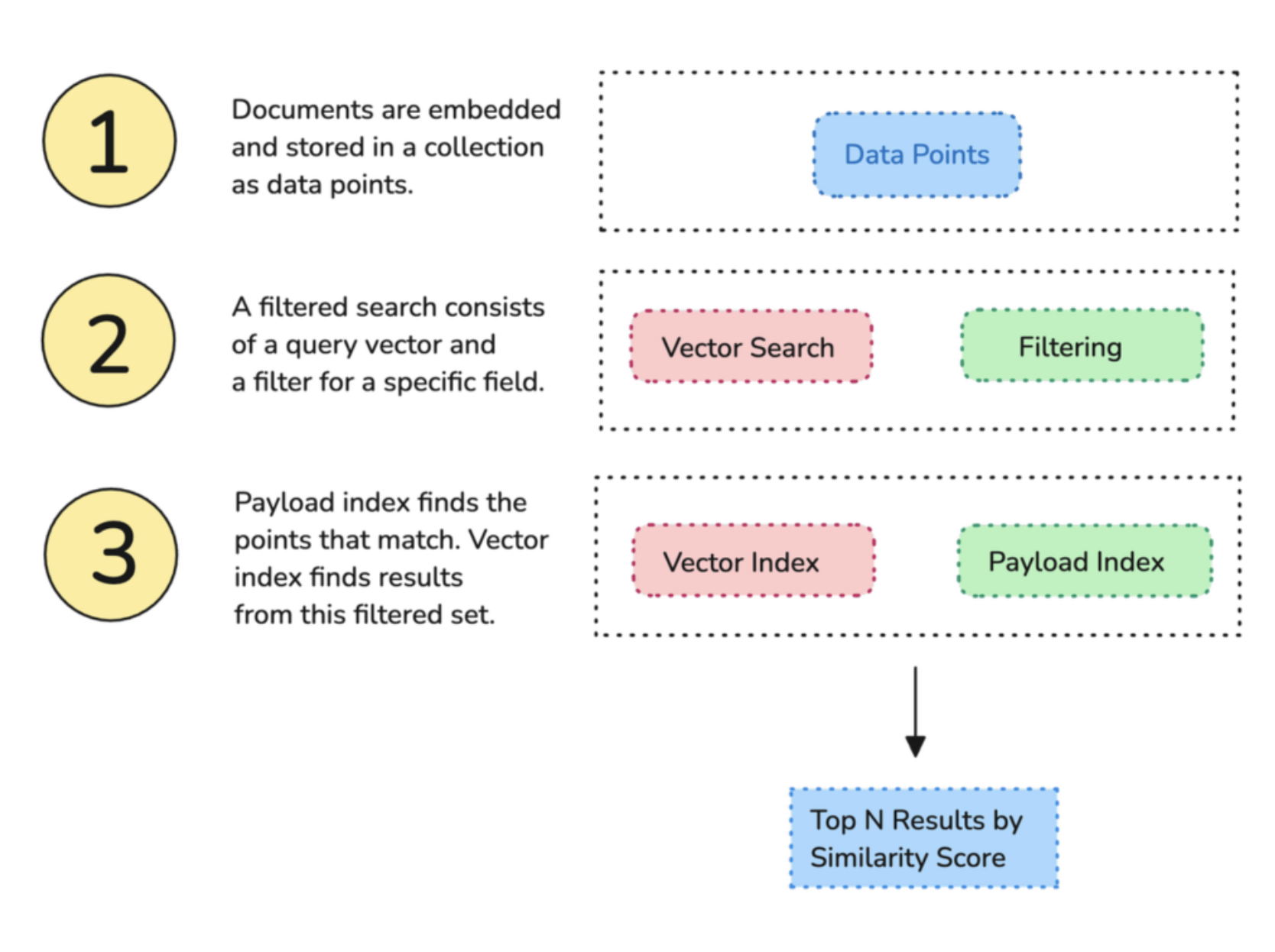
On its own, semantic searching over terabytes of data can take up lots of RAM. Filtering and Indexing are two easy strategies to reduce your compute usage and still get the best results. Remember, this is only a guide. For an exhaustive list of filtering options, you should read the filtering documentation.
Here is how you can create a single index for a metadata field “category”:
PUT /collections/computers/index
{
    "field_name": "category",
    "field_schema": "keyword"
}
from qdrant_client import QdrantClient

client = QdrantClient(url="http://localhost:6333")

client.create_payload_index(
   collection_name="computers",
   field_name="category",
   field_schema="keyword",
)
Once you mark a field indexable, you don’t need to do anything else. Qdrant will handle all optimizations in the background.
Why Should You Index Metadata?
The payload index acts as a secondary data structure that speeds up retrieval. Whenever you run vector search with a filter, Qdrant will consult a payload index - if there is one.
As your dataset grows in complexity, Qdrant takes up additional resources to go through all data points. Without a proper data structure, the search can take longer - or run out of resources.
Payload Indexing Helps Evaluate the Most Restrictive Filters
The payload index is also used to accurately estimate filter cardinality, which helps the query planning choose a search strategy. Filter cardinality refers to the number of distinct values that a filter can match within a dataset. Qdrant’s search strategy can switch from HNSW search to payload index-based search if the cardinality is too low.
How it affects your queries: Depending on the filter used in the search - there are several possible scenarios for query execution. Qdrant chooses one of the query execution options depending on the available indexes, the complexity of the conditions and the cardinality of the filtering result.
- The planner estimates the cardinality of a filtered result before selecting a strategy.
- Qdrant retrieves points using the payload index if cardinality is below threshold.
- Qdrant uses the filterable vector index if the cardinality is above a threshold
What Happens If You Don’t Use Payload Indexes?
When using filters while querying, Qdrant needs to estimate cardinality of those filters to define a proper query plan. If you don’t create a payload index, Qdrant will not be able to do this. It may end up choosing a sub-optimal way of searching causing extremely slow search times or low accuracy results.
If you only rely on searching for the nearest vector, Qdrant will have to go through the entire vector index. It will calculate similarities against each vector in the collection, relevant or not. Alternatively, when you filter with the help of a payload index, the HSNW algorithm won’t have to evaluate every point. Furthermore, the payload index will help HNSW construct the graph with additional links.
How Does the Payload Index Look?
A payload index is similar to conventional document-oriented databases. It connects metadata fields with their corresponding point id’s for quick retrieval.
In this example, you are indexing all of your computer hardware inside of the computers collection. Let’s take a look at a sample payload index for the field category.
Payload Index by keyword:
+------------+-------------+
| category   | id          |
+------------+-------------+
| laptop     | 1, 4, 7     |
| desktop    | 2, 5, 9     |
| speakers   | 3, 6, 8     |
| keyboard   | 10, 11      |
+------------+-------------+
When fields are properly indexed, the search engine roughly knows where it can start its journey. It can start looking up points that contain relevant metadata, and it doesn’t need to scan the entire dataset. This reduces the engine’s workload by a lot. As a result, query results are faster and the system can easily scale.
You may create as many payload indexes as you want, and we recommend you do so for each field that you filter by.
If your users are often filtering by laptop when looking up a product category, indexing all computer metadata will speed up retrieval and make the results more precise.
Different Types of Payload Indexes
| Index Type | Description |
|---|---|
| Full-text Index | Enables efficient text search in large datasets. |
| Tenant Index | For data isolation and retrieval efficiency in multi-tenant architectures. |
| Principal Index | Manages data based on primary entities like users or accounts. |
| On-Disk Index | Stores indexes on disk to manage large datasets without memory usage. |
| Parameterized Index | Allows for dynamic querying, where the index can adapt based on different parameters or conditions provided by the user. Useful for numeric data like prices or timestamps. |
Indexing Payloads in Multitenant Setups
Some applications need to have data segregated, whereby different users need to see different data inside of the same program. When setting up storage for such a complex application, many users think they need multiple databases for segregated users.
We see this quite often. Users very frequently make the mistake of creating a separate collection for each tenant inside of the same cluster. This can quickly exhaust the cluster’s resources. Running vector search through too many collections can start using up too much RAM. You may start seeing out-of-memory (OOM) errors and degraded performance.
To mitigate this, we offer extensive support for multitenant systems, so that you can build an entire global application in one single Qdrant collection.
When creating or updating a collection, you can mark a metadata field as indexable. To mark user_id as a tenant in a shared collection, do the following:
PUT /collections/{collection_name}/index
{
   "field_name": "user_id",
   "field_schema": {
       "type": "keyword",
       "is_tenant": true
   }
}
Additionally, we offer a way of organizing data efficiently by means of the tenant index. This is another variant of the payload index that makes tenant data more accessible. This time, the request will specify the field as a tenant. This means that you can mark various customer types and user id’s as is_tenant: true.
Read more about setting up tenant defragmentation in multitenant environments,
Key Takeaways in Filtering and Indexing
Filtering with Floating Point (Decimal) Numbers
If you filter by the float data type, your search precision may be limited and inaccurate.
Float Datatype numbers have a decimal point and are 64 bits in size. Here is an example:
{
   "price": 11.99
}
When you filter for a specific float number, such as 11.99, you may get a different result, like 11.98 or 12.00. With decimals, numbers are rounded differently, so logically identical values may appear different. Unfortunately, searching for exact matches can be unreliable in this case.
To avoid inaccuracies, use a different filtering method. We recommend that you try Range Based Filtering instead of exact matches. This method accounts for minor variations in data, and it boosts performance - especially with large datasets.
Here is a sample JSON range filter for values greater than or equal to 11.99 and less than or equal to the same number. This will retrieve any values within the range of 11.99, including those with additional decimal places.
{
 "key": "price",
 "range": {
   "gt": null,
   "gte": 11.99,
   "lt": null,
   "lte": 11.99
  }
}
Working with Pagination in Queries
When you’re implementing pagination in filtered queries, indexing becomes even more critical. When paginating results, you often need to exclude items you’ve already seen. This is typically managed by applying filters that specify which IDs should not be included in the next set of results.
However, an interesting aspect of Qdrant’s data model is that a single point can have multiple values for the same field, such as different color options for a product. This means that during filtering, an ID might appear multiple times if it matches on different values of the same field.
Proper indexing ensures that these queries are efficient, preventing duplicate results and making pagination smoother.
Conclusion: Real-Life Use Cases of Filtering
Filtering in a vector database like Qdrant can significantly enhance search capabilities by enabling more precise and efficient retrieval of data.
As a conclusion to this guide, let’s look at some real-life use cases where filtering is crucial:
| Use Case | Vector Search | Filtering |
|---|---|---|
| E-Commerce Product Search | Search for products by style or visual similarity | Filter by price, color, brand, size, ratings |
| Recommendation Systems | Recommend similar content (e.g., movies, songs) | Filter by release date, genre, etc. (e.g., movies after 2020) |
| Geospatial Search in Ride-Sharing | Find similar drivers or delivery partners | Filter by rating, distance radius, vehicle type |
| Fraud & Anomaly Detection | Detect transactions similar to known fraud cases | Filter by amount, time, location |
Before You Go: All the Code Is in Qdrant’s Dashboard
The easiest way to reach that “Hello World” moment is to try filtering in a live cluster. Our interactive tutorial will show you how to create a cluster, add data and try some filtering clauses.
It’s all in your free cluster!